OK, here's some information that I really didn't need to know, but somehow it isn't totally unexpected. Actually, I'm surprised it's so low!
One of my pet peeves (well, it's just a peeve really, I don't play favorites) is people on the phone in a public bathroom. At least once a week I go into the mens room at work and hear someone talking on the phone. OK, given, we're not allowed to use a cell phone in the office because of the security aspects and all, but still, there's a lobby for goodness sake!
When I hear someone using their cell phone in the mens room, I try to be as loud as I possibly can so that the person on the other end of their phone call can know they're talking to someone who is in the mens room.
I was taught as a child that some things should never be done: don't talk while you're eating, don't pick your nose in public, don't spit into the wind (ok, that was from a song, but whatever), and what goes on in the bathroom is supposed to be private. But I guess Facebook has taken the place of the newspaper or the novel. And of course there's ebook readers. Are those waterproof? Keep your grip people.
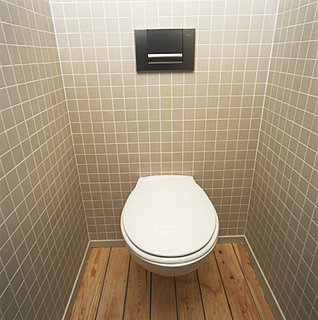
According to a study done by an Atlanta-based media firm – 27% of Americans use Facebook in the bathroom. Shocking? No, not really. Ever since we’ve had cellphones and things to do on them, people have been finding other things to look at besides magazines while sitting on the porcelain throne. Some people read comics, some people write, some people talk on the phone, and some people go on Facebook. Taking into consideration how almost everyone has a data plan or a WiFi connection at home, surfing the internet while on the potty isn’t exactly a foreign activity, I don’t see how Facebooking in the same situation would be any different. And as long as you keep your devices clean and don’t drop them in the toilet, using Facebook while in the toilet shouldn’t be a problem. You can snicker to yourself each time a friend borrows your phone to make a call or play with. What do you think about using Facebook in the toilet? Unacceptable behavior, or do you do it too? Leave us your thoughts in the comments below.
Well, welcome to another Saturday morning, the weekend before the MLK day holiday.
All in all, last week was a slow week, and a reasonably slow week in technology news. There was the big Verizon Wireless announcement about the CDMA iPhone that should be available next month. There’s no significant difference between the AT&T and the Verizon iPhone except the network, and the fact that the Verizon iPhone can’t do both voice and data at the same time (a limitation of CDMA, not specifically Verizon). Well, that and using it as a mobile hotspot.
I did see a few good articles on-line about the Verizon iPhone, but the general recommendation is, if you’re a Verizon customer, wait until the iPhone 5 comes out in June or July, because that one could be using the LTE network. If you’re an AT&T customer and you don’t get good coverage where you are, you should do what a reported 26% of existing iPhone users will do, and switch to Verizon.
One thing I want to look at today is the Samsung Galaxy Tab from Verizon. I got a call last night from a coworker and friend who told me that it would save me money in the long run over my MiFi card, and do texting, GPS, WiFi B,G, and N, 3G, streaming video, all running Android 2.2, so it has Flash 10.1 capabilities, too. It looks like an awesome combination, and can take the place of my Augen GenTouch as well as the MiFi. It could be an exciting mix. I’m hoping to get some time with one today and chat with a Verizon Wireless person about it and see what happens.
I have a business trip coming up next week to San Antonio, Texas. I’ll be flying out on Tuesday, which happens to be the 23rd anniversary of my 25th birthday. The last time I flew to San Antonio on that date was 26 years ago, and that wasn’t my favorite trip (that’s when I enlisted in the Air Force), so hopefully this trip will be a little bit more upbeat!
So, with the trip this week, I’ll be doing a little bit of blogging throughout the week. Saturday will be left for recuperation. Hopefully I’ll be able to get it posted with no issues on Saturday next week. Short post this week, like I said, I didn’t see much happen in tech news. Have a great week.
Well, here I am again, listening to ‘70s music from Slacker.com and charging my back stimulator, so it must be time for me to write something. Last week I talked about my medical issues and the resolutions (hopefully) for them. This week, let’s look at some of the new technology I played with last year.
I’ll start with some of the networking toys I picked up last year.
The first networking toy I picked up last year was because I moved my office from it’s own room into the master bedroom (yes, I know, all you psychology and family counseling folks out there are thinking this is a bad idea). The big problem with moving the office to the master bedroom is that there is no network jack in that room. Since I have so many desktop and server type computers in my office, hard-wire networking is important. After some research, I found the Belkin Gigabit Powerline HD Starter Kit at Best Buy. First off, the name is somewhat misleading. So, what does this do? Well, this kit contains two devices that you plug into power outlets. These devices have network jacks (RJ-45) on the bottom, which you connect with normal CAT-5 cable into your network and the remote device you need to connect to your network. They act as a bridge between the two connections, using your copper power lines in the walls of your house to transmit the data. Cool idea. However, the name of the device is somewhat misleading. While in theory you can transmit data at 1000Kbps across the power lines, that is only in PERFECT conditions, and probably won’t happen for you. On average, I think I’m getting about 300Kbps, which is very nice, and according to everything I’ve seen, it’s probably the best out there, at least when I got it. One issue is that it has problems transmitting across your circuit breakers in the breaker box, so it’s best to try to keep them on the same circuit, if possible. But I do recommend it.
Next is the Linksys E2000 Advanced Wireless-N Router. Linksys got bought out by Cisco last year, so the router now has a Cisco label on it, but it’s still the same Linksys box and web interface that you’re used to if you had one before. I got this because I decided I wanted to upgrade as much of my home network to Gigabit networking as I could, plus, I don’t have a Wireless-N router in the house, so that will speed up lots of connections. All 6 RJ-45 ports on this router are 10/100/1000 capable, including the WAN port on the back that connects to your cable modem or whatever, so if you have fiber or something like that, or a cable modem that will go 50MBps, this is the type of router you need to use that speed best. It also has built in quality of service capabilities that are user (administrator) adjustable, so if you are a gamer, you can make sure that the gaming information goes out to the world faster than other information. The problem is, I haven’t connected it to my home network yet. There will be a major redesign of the network configuration when I install it (there doesn’t have to be, I just want to), so it’s not up and running. But with my experience with it so far (I set it up and updated the firmware on it), I like it, and would recommend it.
Moving on to gadgets, one of the gadgets I picked up this year that I really like (contrary to what the press has said about it) is the Augen Gentouch 78. This is a 7” screen, Android operating system based tablet that was sold in K-Mart of all places, for about a week. After that time, Augen was sent a cease and desist order from Google, because they didn’t get their authority to use the entire Android OS correctly (note to self, make sure to have a lawyer look at EVERYTHING before releasing ANYTHING), so they instantly became a hot item on E-bay and other places. I got mine from a friend at work, who may be, admittedly, a bigger geek than I am. Anyway, after getting the Augen, I had to hack the operating system to have total control over it (called rooting). Then I could install some of the applications I wanted. The Augen specs aren’t that bad, really, considering it sold for $150. It has an all-around cheap feel to it, a resistive screen (you have to press on it), only 800x480 resolution, and no 3G capabilities, GPS, or motion sensing anything, or access to Google’s marketplace (legitimately). But it does have WiFi, a headphone jack, a micro-SD slot that will take up to 16GB, and Android 2.1. I use it mainly for an e-book reader / e-Bible. I’m sure I get some funny looks at church when I whip this thing out of my messenger bag (“It’s a European shoulder bag”) when they say to turn to a particular scripture, but who cares, right? I’m a geek and everyone knows it.
The last gadget I’ll write about today is my phone. I wrote about my Droid when I first got it back in March (thanks, Len!), but I’ve since passed that to my better half and upgraded to the Droid2. The Droid2 has a few major upgrades over the Droid. The most noticeable one for me was the change in the keyboard. The keyboard is much easier to use, and instead of the D-pad type directional device to move around on the screen, the Droid2 has four arrow keys, like a normal keyboard. I find that much more intuitive. The next thing I noticed was that it has Wireless-N capabilities, which is MUCH faster than VerizonWireless’ 3G service. It also has a much faster processor, and more internal memory, both for storage and processing, so you can do more, and faster. The phone is the same as the initial Droid in size and almost the same shape (just enough different so you need to buy a new car mount). I use my phone for music in the car when I drive, GPS when I need to find where I’m going, and I actually use it to talk to people on occasion! E-mail, web browsing, texting, instant messaging, FaceBook, pretty much you name it. My phone is my mini-mobile computer when I’m not at home.
So that’s all the gadgets I’m going to write about today. After my post last week, I got a call from my youngest daughter, who told me that I forgot to write about something that was very important last year (even though I told her last week was all about my back and this week was about gadgets), and that was the birth of my granddaughter. She was born on March 29th, 2010, 9 weeks premature. Her mom was having Diabetic Ketoacidosis (DKA) problems, so the doctors delivered her by emergency caesarian section early in the morning of the 29th. Over the past several months, mother and baby have progressed nicely, with a few ups and downs along the way. She’s now eating baby food, she has some teeth, and loves to talk to grammy and grampy on Skype.
Enough for this week. I’m not sure what next week will be about, but hopefully I can keep this up. Since I need to sit and charge anyway, why not do something productive?
Well, here I am again, listening to ‘70s music from Slacker.com and charging my back stimulator, so it must be time for me to write something. Last week I talked about my medical issues and the resolutions (hopefully) for them. This week, let’s look at some of the new technology I played with last year.
I’ll start with some of the networking toys I picked up last year.
The first networking toy I picked up last year was because I moved my office from it’s own room into the master bedroom (yes, I know, all you psychology and family counseling folks out there are thinking this is a bad idea). The big problem with moving the office to the master bedroom is that there is no network jack in that room. Since I have so many desktop and server type computers in my office, hard-wire networking is important. After some research, I found the Belkin Gigabit Powerline HD Starter Kit at Best Buy. First off, the name is somewhat misleading. So, what does this do? Well, this kit contains two devices that you plug into power outlets. These devices have network jacks (RJ-45) on the bottom, which you connect with normal CAT-5 cable into your network and the remote device you need to connect to your network. They act as a bridge between the two connections, using your copper power lines in the walls of your house to transmit the data. Cool idea. However, the name of the device is somewhat misleading. While in theory you can transmit data at 1000Kbps across the power lines, that is only in PERFECT conditions, and probably won’t happen for you. On average, I think I’m getting about 300Kbps, which is very nice, and according to everything I’ve seen, it’s probably the best out there, at least when I got it. One issue is that it has problems transmitting across your circuit breakers in the breaker box, so it’s best to try to keep them on the same circuit, if possible. But I do recommend it.
Next is the Linksys E2000 Advanced Wireless-N Router. Linksys got bought out by Cisco last year, so the router now has a Cisco label on it, but it’s still the same Linksys box and web interface that you’re used to if you had one before. I got this because I decided I wanted to upgrade as much of my home network to Gigabit networking as I could, plus, I don’t have a Wireless-N router in the house, so that will speed up lots of connections. All 6 RJ-45 ports on this router are 10/100/1000 capable, including the WAN port on the back that connects to your cable modem or whatever, so if you have fiber or something like that, or a cable modem that will go 50MBps, this is the type of router you need to use that speed best. It also has built in quality of service capabilities that are user (administrator) adjustable, so if you are a gamer, you can make sure that the gaming information goes out to the world faster than other information. The problem is, I haven’t connected it to my home network yet. There will be a major redesign of the network configuration when I install it (there doesn’t have to be, I just want to), so it’s not up and running. But with my experience with it so far (I set it up and updated the firmware on it), I like it, and would recommend it.
Moving on to gadgets, one of the gadgets I picked up this year that I really like (contrary to what the press has said about it) is the Augen Gentouch 78. This is a 7” screen, Android operating system based tablet that was sold in K-Mart of all places, for about a week. After that time, Augen was sent a cease and desist order from Google, because they didn’t get their authority to use the entire Android OS correctly (note to self, make sure to have a lawyer look at EVERYTHING before releasing ANYTHING), so they instantly became a hot item on E-bay and other places. I got mine from a friend at work, who may be, admittedly, a bigger geek than I am. Anyway, after getting the Augen, I had to hack the operating system to have total control over it (called rooting). Then I could install some of the applications I wanted. The Augen specs aren’t that bad, really, considering it sold for $150. It has an all-around cheap feel to it, a resistive screen (you have to press on it), only 800x480 resolution, and no 3G capabilities, GPS, or motion sensing anything, or access to Google’s marketplace (legitimately). But it does have WiFi, a headphone jack, a micro-SD slot that will take up to 16GB, and Android 2.1. I use it mainly for an e-book reader / e-Bible. I’m sure I get some funny looks at church when I whip this thing out of my messenger bag (“It’s a European shoulder bag”) when they say to turn to a particular scripture, but who cares, right? I’m a geek and everyone knows it.
The last gadget I’ll write about today is my phone. I wrote about my Droid when I first got it back in March (thanks, Len!), but I’ve since passed that to my better half and upgraded to the Droid2. The Droid2 has a few major upgrades over the Droid. The most noticeable one for me was the change in the keyboard. The keyboard is much easier to use, and instead of the D-pad type directional device to move around on the screen, the Droid2 has four arrow keys, like a normal keyboard. I find that much more intuitive. The next thing I noticed was that it has Wireless-N capabilities, which is MUCH faster than VerizonWireless’ 3G service. It also has a much faster processor, and more internal memory, both for storage and processing, so you can do more, and faster. The phone is the same as the initial Droid in size and almost the same shape (just enough different so you need to buy a new car mount). I use my phone for music in the car when I drive, GPS when I need to find where I’m going, and I actually use it to talk to people on occasion! E-mail, web browsing, texting, instant messaging, FaceBook, pretty much you name it. My phone is my mini-mobile computer when I’m not at home.
So that’s all the gadgets I’m going to write about today. After my post last week, I got a call from my youngest daughter, who told me that I forgot to write about something that was very important last year (even though I told her last week was all about my back and this week was about gadgets), and that was the birth of my granddaughter. She was born on March 29th, 2010, 9 weeks premature. Her mom was having Diabetic Ketoacidosis (DKA) problems, so the doctors delivered her by emergency caesarian section early in the morning of the 29th. Over the past several months, mother and baby have progressed nicely, with a few ups and downs along the way. She’s now eating baby food, she has some teeth, and loves to talk to grammy and grampy on Skype.
Enough for this week. I’m not sure what next week will be about, but hopefully I can keep this up. Since I need to sit and charge anyway, why not do something productive?
Welcome back to rumor central again. Here's another article about the Verizon iPhone that actually takes all the pieces that have been out there, all the "evidence", so to speak, and ties it all together. The case is very strong for the release of information on the iPhone on Verizon this coming Thursday, with availability in February. But, read the article. You may want to wait until summer before you jump on this.
Ah, the Verizon iPhone. In our bizarre careers as tech journalists, if there's one question we've heard more than 'When is Verizon getting the iPhone?' we can't think of it. Also, outside the original rumors for the iPhone and iPad, we can't think of another product so heavily teased by those in the know and those not in the know -- though mostly by those not in the know.
But then we heard Verizon is having a little get together on Tuesday, which is particularly odd timing because Verizon has a huge presence and a large amount of announcements at this year's CES. Rumors of the event being a Verizon iPhone announce immediately flared up, but there were still reservations: Apple usually announces its own products at its own corporate campus -- why would Verizon be doing the honors in NY?
That's when the Wall Street Journal swooped in with a confirmation: the Verizon iPhone will be announced on Tuesday, and WSJ's All Things D even thinks Steve Jobs will be there. So, who is this fly-by-night 'Wall Street Journal' publication we speak of? They have one of the best track track records on Apple rumors in the business, and they've been leading the Verizon iPhone predictions from day one. Follow after the break as we talk it out.
Well, here we are at rumor central again. Looks like the Wall Street Journal has picked up on the rumor, and has "a source familiar with the matter". The announcement should come next thursday.
Well, here we are: the Wall Street Journal says Verizon will indeed announce the iPhone at its mysterious Tuesday event, according to 'a source familiar with the matter.'
Greetings, and welcome to rumor central! Here's a juicy tidbit of info, if you're an iPhone lover but an AT&T hater. Rumor has it the Verizon iPhone will be released between February 3rd and 6th. Again, that's a rumor with a capital R and a capital UMOR, too. But it does follow the known patterns of both Apple and Verizon release schedules.
Interesting. Will it happen? Or is this like predicting the end of the world?
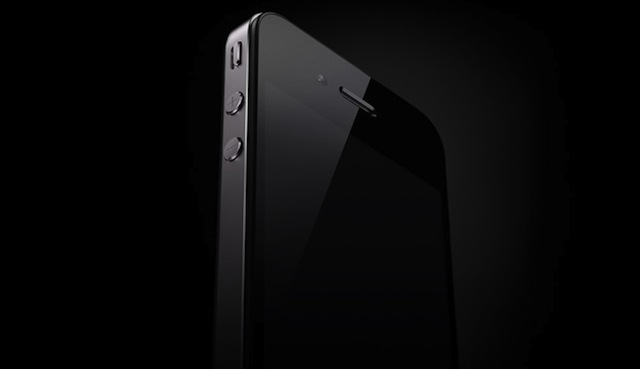
Speculation is going around that the Verizon iPhone announcement is almost here. Whispers are that Apple has blocked employee vacation requests between February 3rd and February 6th, which is Thursday through Sunday. The vacation freeze has been confirmed to be in effect in several regions in the US. It’s worth noting that Apple picked the dates of the 24th to 27th for the launch of its iPhone 4, also Thursday through Sunday, not to mention that Verizon tends to launch new devices on Thursdays too. Of course, there isn’t any confirmation that the Verizon iPhone is the device that will be announced, but the rumors definitely do seem to point in that direction.
I don't think I can say this enough, I wish I were in Vegas right now for CES.
Looks like the Bionic specs I looked at and posted yesterday were off in one area, it has 16GB built-in RAM, so that's an extra level of awesomeness. Estimated release on Verizon, early Q2 (April-ish).
The Droid Franchise has a new title: the Motorola Droid Bionic, of course, for Verizon Wireless. Announced last night at Motorola’s CES 2011 Press Event, we were able to get a hands-on demonstration walking us through the main hardware features of the phone as well as some great software inclusions.
One of my FAVORITE features of this phone is the HDMI mirroring. With many Android phones including HDMI Out, they won’t mirror whatever is on your screen, they’ll only allow you to connect for the purposes of playing locally stored video files or picture files or items in your media gallery. The Droid Bionic allows you to play games, browse the web, and do whatever you want to LOCALLY, showing the exact same thing through HDMI.
Of course the Droid Bionic’s 4G LTE connection on Verizon’s network is one of the main highlights of this phone and it will surely magentize a good share of big red customers. Some of its other key features include an 8MP camera, 1080p HDMI, 720p HD video recording, and a dual core processor each running at 1GHz.
While only the Motorola Atrix was showing off the nifty docking to laptop/desktop screen feature, we’re hopeful Motorola will empower this for all their phones, and really, there is no reason NOT to.
Oh, to be in Las Vegas right now. CES, the Consumer Electronics Show, it geek heaven right now.
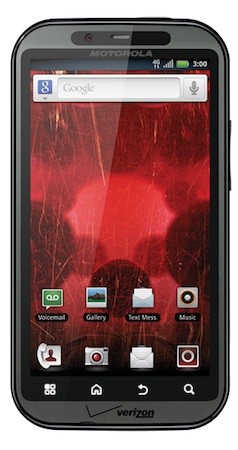
Well, we knew it was coming, and here it is, Motorola's new Android based handset for LTE on Verizon Wireless. LTE is Verizon's 4th generation or 4G wireless technology. And this baby looks amazing. Compared to the Droid2 I have, it has 2x the processing power, less RAM, a front facing camera (now why would it have one of those? Can you say SKYPE?), and an 8Mp camera on the back. The one thing it's missing that I use every day? The QWERTY keyboard. Well, you can't have everything, now, can you? How about Internet and phone at the same time?
Things are getting real with Motorola -- it's just announced the LTE-equipped Droid Bionic which, like the Xoom tablet introduced alongside it, will be headed to Verizon. The phone packs a dual-core processor with each core humming along at 1GHz, a 4.3-inch QHD screen, 512MB of RAM, a front-facing VGA camera, and an 8-megapixel on the rear.
Well, it’s Saturday morning for me, 1/1/11. 2010 was an exciting and eventful year, with many ups and downs. I’ll go over a few of the personal highlights and lowlights from last year.
First, the major player in my life for 2010, my chronic back pain. It’s hard for me to even explain what it’s like to know that you have a chronic condition, that is, something that you’ll never completely recover from. First, into the way-back machine. On Father’s Day 2008 I herniated the disc at L5-S1 in my back (thanks Erin! Just kidding). After a microdiscectomy to remove the bulge, I did physical therapy until November. I was progressing well. Christmas and New Years went well, and I was improving into 2009. Then in February I was walking to meet a friend for lunch and slipped on something (it may have been ice, it may have been too much salt on the little handicap ramp for the sidewalk) and landed sitting down. I knew something was wrong, but I was going to lunch anyway. Well, to top it off, I was stood up for lunch, too. The pain increased slowly, and after a week or so I had another MRI to discover I had reherniated L5-S1 and also herniated L4-L5 on top of it.
Begin more than a year of pain management treatments, ranging from trigger point injections to radio frequency nerve ablation, physical therapy, medications, and attempts at exercise.
Fast forward to around June of 2010 (yes, I’m finally into 2010. Be quiet and listen. You knew I’d get there). After the pain management doctor was disapproved by my insurance for Botox treatments on my back, he did get approval for a neurostimulator test. Make sure you follow the link.
After the successful test, I had surgery on September 23rd, with one night stay in the hospital (they didn’t want to send me home with heavy drugs while using a CPAP to sleep. Not a good combination). That and I wasn’t really ready to go home. After about a week or so of recovering and working from home, I started going back to work. Probably too soon. The recovery and healing process took much longer than I would have liked. The paddle of the neurostimulator between my shoulder blades was irritating the spinal column at that location, causing “Phantom pain” that felt like I’d broken a rib, and there was nothing I could do about it but take more meds. Not the result I wanted.
In early December I went in for a “Tune up” of my neurostimulator. The technician adjusted the power output levels of the electrodes. Since the scar tissue had started to develop, the level of pain control had decreased. I guess the decrease was significant, because she increased the levels by 4! The result was amazing. We took our oldest and grandmonster to Ohio for that weekend to visit his other grandparents while we stayed in a hotel. It was a cute little town, and we got the chance to walk around (!), relax, and just take in small town life again. We found an antique shop that had a cane with a brass horse head as the handle, so I got that, along with some Christmas presents. I’m sure we spent too much money in that little town, but we had fun. And even though there was a storm coming, I made it through the entire weekend with little pain!
One of the issues with having an implanted neurostimulator is that you need to remember to recharge your battery every week. I was told that if the battery ever drains completely, it will need to be replaced (I hope that’s not true). Anyway, I’ve set 9:00 AM on Saturdays as my time to charge up, so maybe I can remember to do some blogging during that time.
How does the neurostimulator work? Glad you asked. It’s basically a pacemaker for my back. The electrodes are placed over the nerve bundles around T7,T8 and T9 in my back (the neurosurgeon had to do a partial laminectomy to put it in place), with the power pack and controller implanted below the belt line in my butt. I can change the power levels and programming (I have three programs I can use) with a hand held controller that communicates through electromagnetic induction to the implanted controller. Charging works the same way; I have a battery pack that I charge from standard 110v current. When it’s fully charged (it can recharge the implant a few times on 1 charge) I can connect the “antenna” to it and use electromagnetic induction and inductive coupling to transfer the power from the external battery to the internal battery. I’m doing that right now. So far it’s been about an hour; my Christmas recharge took an hour and 45 minutes, so I’ve got some time left. It comes with a belt so I can walk around if I want to, but I don’t mind being forced to stay in a chair for 2 hours or so. It’s a good excuse.
My hope is that since I’m forced to stay in one place for so long, maybe I’ll remember to post something here every week (but don’t hold your breath, ok?).
So, now I’m officially one of the Borg. On Twitter, I’ve jokingly called myself 13 of 12, because the Borg don’t like me very much. I may have a few more “Tune-ups” in my future, depending on the build-up of scar tissue under the electrodes. We’ll see what happens. I’m also beginning the arduous process of weaning off the Neurontin, which is the primary nerve pain medication I’ve been on. Looking at the list of possible side-effects, sometimes I wonder which is worse, the pain or the medication. I’d have to say, it was the pain. Hopefully I can be off most of it by the end of February.
One of the biggest (pun intended) side-effects I’ve been dealing with is weight gain. From Father’s Day 2008 to October 2008 I put on 50 pounds. My weight hasn’t changed significantly since then. My goal for this year is to drop one pound a week for the year. That will get me down to around where I was when I retired from the Air Force six years ago, and hopefully a much more healthy weight.
Next week, I’ll take a look back at the technology I acquired in 2010.
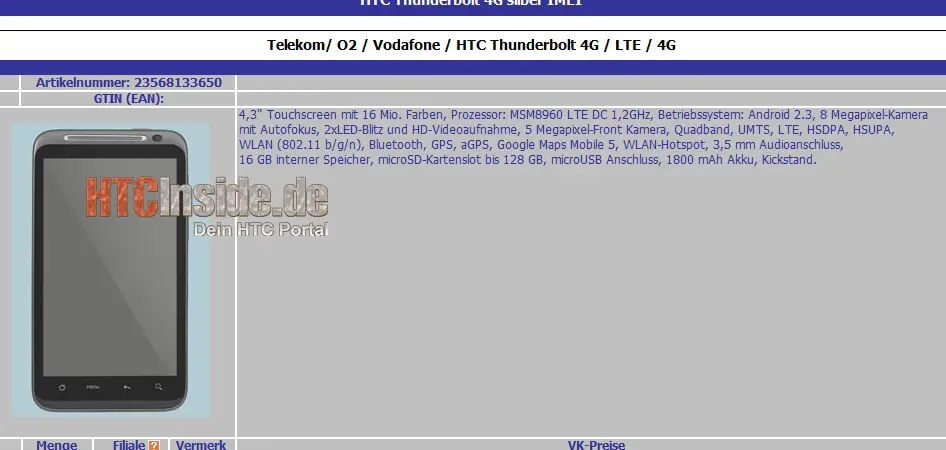
For those of you who don't know, the Thunderbolt is the new HTC phone for Verizon Wireless, their first LTE 4G phone. It's not supposed to be released until the Consumer Electronics Show next month, but this article has a link to a German website with supposed specs on the phone. If these specs are for real, this is my next phone, keyboard or not (I love my Droid2 keyboard!). However, the GOS acronym stands for grain of salt. Now we'll wait until CES to find out what the REAL specs are.
This is from the so-crazy-it-just-might-be-awesome department. I received an email from a tipster who told me to “eat this” and prompted me to a German website playing host to what is allegedly the specifications to the upcoming HTC Thunderbolt.
You can click to embiggen.
The specs are beyond whack crazy, but even if some of them are true then forget the Optimus 2X. All specs listed in the picture are subject to change if mein Deutsch sucks.
4.3″ screen
Dual-Core 1.2GHz processor
Gingerbeard
8MP Camera w/2 LED flash
5MP front camera
16GB internal storage
1800 mAh battery
Is it January sixth yet?
[via bestboyz.de | Thanks, Robert! It tastes delicious.]
Yeah, I don’t believe a damn word of this. But weirder things have happened.
Well, I've had my Droid2 for a while now, and I'm liking it just fine, but I was at the Verizon Wireless store getting my better half a Christmas present (media dock so she can try to remember to charge it every night) and they told me I still had an upgrade option on MY phone. I thought for a second. My phone? I just upgr-. . . Oh, that's right. I used a different upgrade option to do my phone, and then gave my old Droid to my better half! Hand-me-down phone, but still a good phone. So, I'm thinking about 4G LTE. Since I live in the "DC Metro Area", we have 4G LTE here, but my house is about 1/4 mile outside the coverage map that Verizon Wireless has on their website. But I've been told that if you're in 4G mode, you can talk on the phone AND use data at the same time, a big breakthrough for Verizon. Now, don't quote me on that, because I haven't heard it from the Verizon guys yet. We'll see what happens.
Anyway, here's some pics of Verizon's first 4G LTE phone.
Well, it was only a matter of time. With just about one week to go before Verizon officially unveils their big 4G handset, the odds of a leaked picture were just about certain. The guys at Droid Life have happened upon one dozen images of HTC's third 4G 'first' and it's a beauty. It's also pretty much everything we'd been expecting over the last five months.
Take a look at the mini gallery below and you'll see more than passing resemblances to the EVO 4G. That's just fine with us, though, as it's one of our favorite phones from this past year. The Thunderbolt 4G looks like a slightly evolved version of the Sprint device, with a sexed up, smoother design.
It's worth pointing out that the kickstand is considerably thicker this time around, working in both portrait or landscape mode. We can clearly see what appears to be some type of speaker on the back, below said kickstand. Oh, and that 'With Google' makes us feel real warm and fuzzy. Should be nary a hint of Bing on the Thunderbolt 4G. That is, unless you want to download it yourself.
We'll be in Las Vegas next week when Verizon drops this one on us and fills in the spec details. Anyone expecting a surprise out of this one still?
Be sure to head to Droid Life to see the other pictures!
Have you ever (or a friend) dropped their BlackBerry in the toilet or water before and don’t know what to do? (Most of the time people drop their phone in the toilet) And then the first thing you do is try to turn it back on to see if it is still work. But its NOT! So what do you do? Maybe it’s time to switch to an iPhone? But you only got your BlackBerry a few months ago…
Well first of all, you do not need to go get yourself an iPhone. Second of all, you can probably retreive your phone if you follow the suggestions in this article.
It probably won’t be a good idea to try to turn your phone back on when it is soaking wet, cause you’ll probably end up blowing something up. So the best thing to do is dry the phone first and then draw out all the moisture in the device. There are several ways you can do, put the phone in:
a ziplock bag of uncooked rice and let it sit for a few hours
a bag with some silica packets
an oven with just the oven light on for a few days
a bag of clay-based absorbent
the sun
or you can blow dry it for a couple hours, while panting and worrying about your phone and hope it’ll be fine.
But if your phone happens to fall in salt water, you will need to rinse the phone out with distilled/deionized water first in order to remove the salt. You shouldn’t rinse with tap water because the minerals/ions are conductive and will remain there after the water dries, which may cause a short circuit later on.
So no need to take out another few hundred bucks to get another BlackBerry and definitely don’t need to switch to an iPhone, follow these steps and your phone will be running as new!
I have to say, this is getting ridiculous. Just because you buy an airline ticket doesn't mean that you give up all your constitutional rights.
I got a comment to the last article I reposted on this topic saying "I don't have a problem with it because I don't have anything to hide". Well, I don't have anything to hide, but that doesn't mean I want anyone taking pictures of my nothing to hide, or grabbing onto it. I gave up being an exhibitionist a long time ago.
I'm liking the "Opt-out day" on November 24th. That could bring air travel to a screeching halt. Maybe the TSA will begin to understand that there need to be limits.
Like some others, I may not have any other option than to be assaulted rather than the metal detector or the new toy that's being deployed to so many different airports around the US. Of the options below, I get door #2, or a modified door #3, don't travel by air. The train is looking to be a good option, as is driving for multiple days vs being subjected to the humiliation and degradation of this treatment. At this point, it's almost "any expense to avoid being mistreated" is where we're at.
I encourage, no I implore you all to think about the liberties you are loosing, almost on a daily basis. But don't just think about it; do something about it. If you're silent, you are giving your approval. Don't travel by air on November 24th 2010, or chose to "opt-out" of the abuse. And if you can, record what happens on your cellphone, voice only if that's all you can do, but video would be more useful. If this needs to be taken to the courts, visual evidence is the best thing you can have.
Our liberties are being tread upon. We need to remind those doing the treading about the Constitution. As a citizen of the United States, you and I have rights. Even Paul knew his rights as a citizen in Acts 22:
As they were shouting and throwing off their cloaks and flinging dust into the air, the commander ordered that Paul be taken into the barracks. He directed that he be flogged and interrogated in order to find out why the people were shouting at him like this. As they stretched him out to flog him, Paul said to the centurion standing there, “Is it legal for you to flog a Roman citizen who hasn’t even been found guilty?”
When the centurion heard this, he went to the commander and reported it. “What are you going to do?” he asked. “This man is a Roman citizen.”
The commander went to Paul and asked, “Tell me, are you a Roman citizen?”
“Yes, I am,” he answered.
Then the commander said, “I had to pay a lot of money for my citizenship.”
“But I was born a citizen,” Paul replied.
Those who were about to interrogate him withdrew immediately. The commander himself was alarmed when he realized that he had put Paul, a Roman citizen, in chains.
Take back your liberties, before it's too late. And, by the way, read your Constitution. If you don't know, you lose.
They who can give up essential liberty to obtain a little temporary safety deserve neither liberty nor safety. ~ Benjamin Franklin
________________
Homeland Security Secretary Janet Napolitano’s Let’s Make a Deal approach to keeping America’s airports secure isn’t generating too many fans. Perhaps it’s because the choices given are so insulting to the rights enjoyed by a free people:
Door #1: Have nude pictures of yourself beamed to some video monitor to be viewed by a total stranger where it may or may not be stored; or,
Door #2: Allow yourself to be groped, poked, patted down, felt up, frisked, and squeezed at the hands of some police academy reject in a Smurf-blue uniform [Photo: Kim Kardashian at LAX]; or…
Door #3: Don’t travel.
Worse is the fact that, if you have children, you have the same choices to make on their behalf:
Have nude images of your kids viewed (and stored?) by strangers,
I’ve got to admit that, as a frequent flyer, I’ve sort of gotten used to being frisked. Perhaps airport security screeners confuse old bikers in Harley shirts with Al Quaeda, but the pat downs have been an almost regular occurrence since 9/11. While most of the pat downs over the years have been of the generic sort, a few after 9/11 seemed to be going a little too far as well—the fingers inside the waistline by an officer of the opposite sex was one such memorable occasion.
It wasn’t until a couple of weeks ago, however, while traveling through an airport in the Midwest that I received the double treatment—the body imaging device and the pat down (no open palms on the genitals though) that the Smurfs began to get annoying. At the same time, the pilots’ and flight attendants’ unions began to grumble that their members were being traumatized by the TSA’s new security measures.
Since then, the controversy has grown considerably and Janet Napolitano is faced with trying to appease a variety of constituencies while remaining seemingly resolved to infringe on Americans’ constitutional right to be “secure in their persons…against unreasonable searches.”
One individual has started a website called optoutday.com, which suggests that people opt out of the body imaging on November 24, the day before Thanksgiving (when the volume of air travel is particularly high). According to the website’s founder, Brian Sodergren, the goal is to get people to experience the rigorous pat-down so they can discuss it around the Thanksgiving table:
“Getting a plane ticket doesn’t mean you’re consenting to someone being able to look under your clothes or feel your genitals,” said Sodergren during a phone interview with ABC15.
Sodergren wants passengers, pilots and flight attendants to “opt-out” of the X-ray body scanners and go through the pat down procedure.
“It’s too much, I don’t want my wife or my child going through the pat-downs and have their genitals touched, people need to understand what’s going on,” said Sodergren.
If you are selected for secondary screening after you go through the metal detector and it does not go off, and “sss” is not written on your boarding pass, ask the TSA officer if the reason you are being selected is because of your head scarf.
In this situation, you may be asked to submit to a pat-down or to go through a full body scanner. If you are selected for the scanner, you may ask to go through a pat-down instead.
Before you are patted down, you should remind the TSA officer that they are only supposed to pat down the area in question, in this scenario, your head and neck. They SHOULD NOT subject you to a full-body or partial-body pat-down.
You may ask to be taken to a private room for the pat-down procedure.
Instead of the pat-down, you can always request to pat down your own scarf, including head and neck area, and have the officers perform a chemical swipe of your hands.
How perfectly Orwellian that, while non-Muslim Americans are having their Fourth Amendment rights being groped, grabbed and trampled by Napolitano & her gang, Muslims are being urged to use the First Amendment’s Freedom of Religion provision to all-but-ignore the TSA screening measures.
Meanwhile, for those of us who are stuck traveling for a living, until this gets sorted out, we’ll just suck it up and suck it in, as the Smurfs continue to get up close and really, really personal.
__________________
“I bring reason to your ears, and, in language as plain as ABC, hold up truth to your eyes.” Thomas Paine, December 23, 1776
First, I'm a Christian, second, I'm a geek. I'm a retired Air Force officer, working and living in the Washington DC Metro area. I'm married with 3 adult kids, only one living at home. I attend the Warrenton church of Christ in Warrenton, Virginia.

 According to a study done by an Atlanta-based media firm – 27% of Americans use Facebook in the bathroom. Shocking? No, not really. Ever since we’ve had cellphones and things to do on them, people have been finding other things to look at besides magazines while sitting on the porcelain throne. Some people read comics, some people write, some people talk on the phone, and some people go on Facebook. Taking into consideration how almost everyone has a data plan or a WiFi connection at home, surfing the internet while on the potty isn’t exactly a foreign activity, I don’t see how Facebooking in the same situation would be any different. And as long as you keep your devices clean and don’t drop them in the toilet, using Facebook while in the toilet shouldn’t be a problem. You can snicker to yourself each time a friend borrows your phone to make a call or play with. What do you think about using Facebook in the toilet? Unacceptable behavior, or do you do it too? Leave us your thoughts in the comments below.











 Posts
Posts


